> For the complete documentation index, see [llms.txt](https://docs.bloomshire.xyz/llms.txt). Markdown versions of documentation pages are available by appending `.md` to page URLs; this page is available as [Markdown](https://docs.bloomshire.xyz/introduction/getting-started.md).
# Getting Started
Your first session.
Access is invite-only while Bloomshire is in development.
## Signing in
Connect an EVM wallet and sign the prompt. That is your account. You will be asked to pick a name, which you can change later in the journal's Settings tab.
Bloomshire will never ask for a seed phrase or a private key.
## Make your farmer
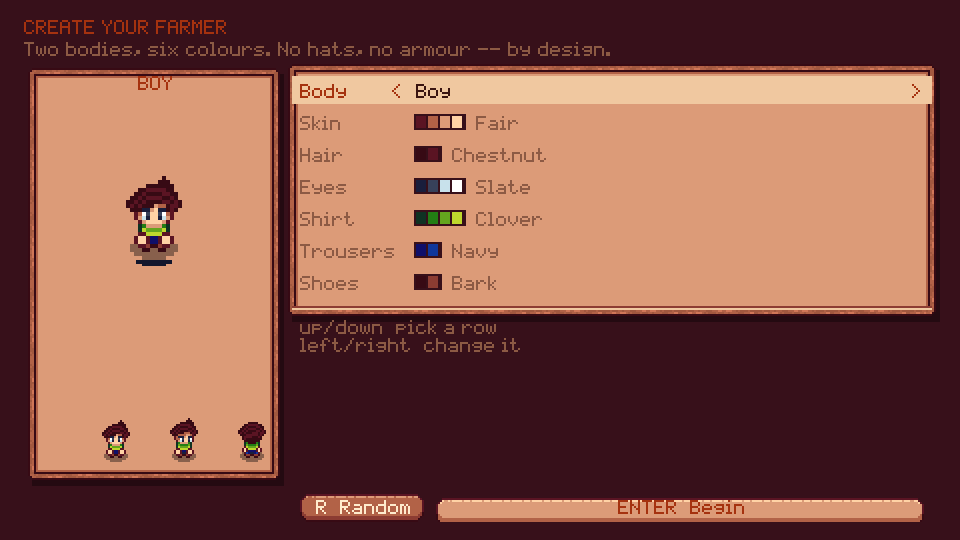
Two bodies and six colour choices: skin, hair, eyes, shirt, trousers and shoes.
## Your first ten minutes
You start at the farm, and Marlow is waiting in the crop beds. Talk to him.
He hands over his hoe, his watering can and a handful of carrot seed, then walks you through the whole thing: break the soil, sow, water, wait, and pull the carrots when the leaves start to sway. Carrots are quick, so you will see the full cycle before you leave the field.
Then he sends you into town to meet Maren.
## The people worth finding
Each villager teaches a trade by needing something done, and most of them hand you the tool for it.
| | | |
| ----------- | ------------- | -------------------------------- |
| **Maren** | Valley Elder | The town, and the delivery board |
| **Marlow** | Old Farmer | Farming |
| **Rowan** | Ranger | Woodcutting and combat |
| **Wren** | Fisher | Fishing |
| **Bram** | Smith | Mining and smelting |
| **Tamsin** | Cook | Cooking |
| **Pell** | Carpenter | Crafting |
| **Juniper** | Herbalist | Foraging |
| **Hollis** | Animal Keeper | Animals |
Follow their quests. They are what opens the roads out of the valley.
## Controls
| Key | |
| ------- | ----------------------------------------------- |
| `WASD` | Move. You run by default; hold `Shift` to walk. |
| `SPACE` | Use what you are holding |
| `E` | Talk, enter, harvest, fish, cook, sleep |
| `M` | Map |
| `1`-`0` | Hotbar |
| `I` | Backpack |
| `J` | Journal |
| `T` | Wait an hour |
| `R` | Sleep, at your farmhouse door |
| `H` | Controls |
## Three things worth knowing early
Crops only grow while they are watered, and the water dries overnight. Rain does the job for you.
The Delivery Center always has one order a brand new farm can fill. It pays better than selling the same goods.
Sleeping at your farmhouse ends the day, sells anything in your shipping bin and saves your game.
---
# Agent Instructions
This documentation is published with GitBook. GitBook is the documentation platform designed so that both humans and AI agents can read, navigate, and reason over technical content effectively. Learn more at gitbook.com.
## Querying This Documentation
If you need additional information that is not directly available in this page, you can query the documentation dynamically by asking a question.
Perform an HTTP GET request on the current page URL with the `ask` query parameter, and the optional `goal` query parameter:
```
GET https://docs.bloomshire.xyz/introduction/getting-started.md?ask=&goal=
```
`ask` is the immediate question: it should be specific, self-contained, and written in natural language.
`goal` is optional and describes the broader end goal you are ultimately trying to accomplish on behalf of the user. GitBook uses it to tailor the answer towards what is most useful for that goal.
The response will contain a direct answer to the question and relevant excerpts and sources from the documentation.
Use this mechanism when the answer is not explicitly present in the current page, you need clarification or additional context, or you want to retrieve related documentation sections.